
AMBIENCE RESTRUKTOR
restructure the spatial DNA of tracks, delivering the punch, warmth, air
RESTRUKT
Surgically extracts unwanted room bleed, ring, and muddy sustain from the input signal without destroying transient punch
RESTRUKT is the evolution of this heritage. It streamlines this historically complex, multi-plugin routing into a single, cohesive interface. By linking multiband sustain reduction, analog tape drive, and modern particle shimmer in series, RESTRUKT gives you classic acoustic control with modern, pristine digital fidelity
– Subtractive Acoustic Shaving
– Harmonic Excitation (Tape Saturator)
– Adaptive Space Injection
- GUI panel design updated
- Add Input level control
- Add LINK (level compensation between In/Out levels)
FREE
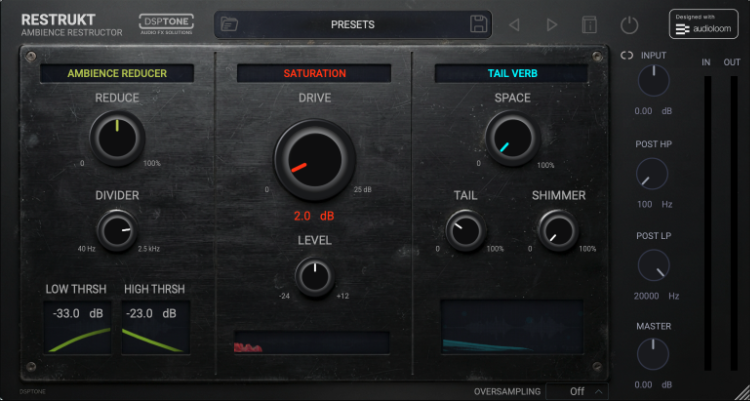

REAL PROBLEM
In modern audio production, natural acoustics are notoriously difficult to control. Drum loops often carry muddy room resonance or mic bleed. Snares ring out too long and clutter the mid-range. Acoustic instruments recorded in untreated home studios carry cheap room reflections that wash out a mix.
Standard utility gates are too crude for this problem—they simply shut off the audio abruptly. Adding standard reverb on top only piles more clutter onto an already messy acoustic foundation, resulting in a muddy, unprofessional mix.
SOLUTION, THAT WORK
RESTRUKT is a spatial reconstruction engine designed to strip away unwanted natural acoustic environments and replace them with pristine, driven, synthetic space.
Instead of fighting messy rooms or long decays, RESTRUKT tears down the acoustic footprint of any signal.
It uses a precise, multiband subtractive engine to shave off unwanted bleed and sustain. Then, it runs the dry, punchy transients through a warm tape saturation circuit before injecting a sparkling, highly controlled, shimmering burst of synthetic space
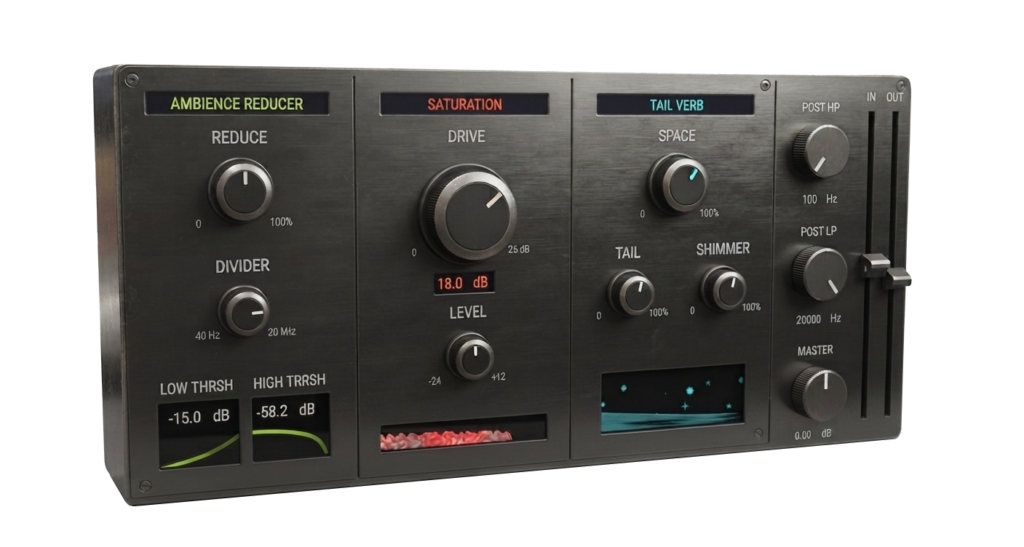
History Of Concept
The core philosophy of RESTRUKT is rooted in the history of drum production and creative acoustic manipulation.
In the early 1980s, legendary producer Hugh Padgham and engineer Peter Gabriel accidentally discovered the “gated reverb” sound. By routing a massive, ambient drum room mic through a heavily compressed talkback channel and a fast-acting noise gate, they realized they could capture a massive, explosive snare hit that vanished instantly into dead silence. This sound defined a decade of pop and rock production.
By the late 1990s, hardware transient designers introduced envelope-shaping to the masses, allowing engineers to mechanically shorten or lengthen the sustain of hits without relying on traditional signal thresholds. In the modern digital era, producers frequently combine transient gates, analog saturation, and short, bright reverbs to “synthesize” artificial room sounds for dry sample libraries.
Subtractive Acoustic Shaving
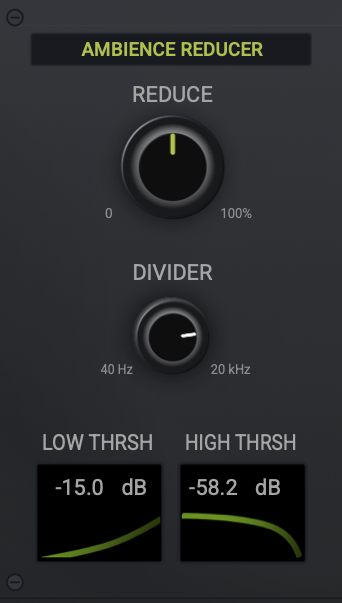
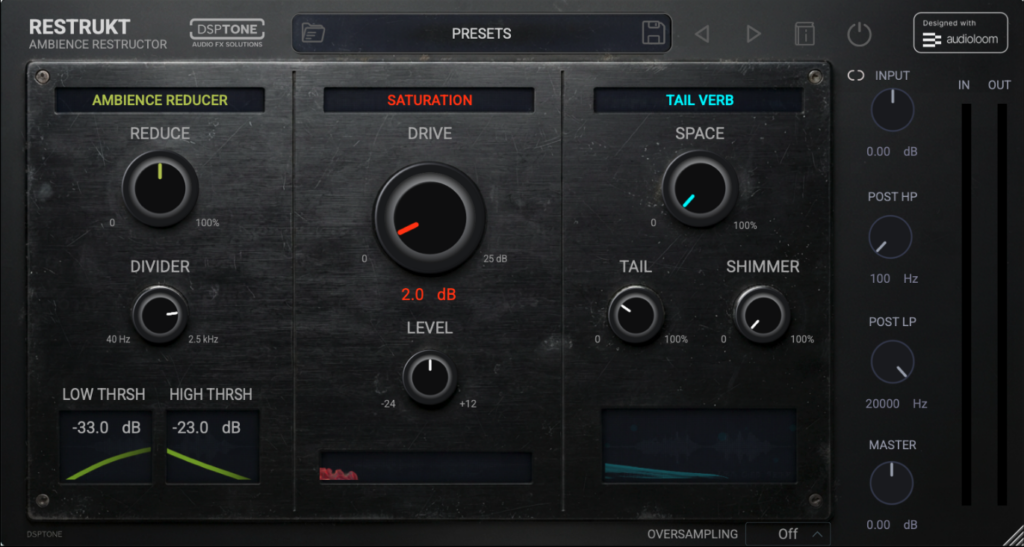
A precise, multiband envelope shaper that surgically extracts unwanted room bleed, ring, and muddy sustain from the input signal without destroying transient punch
REDUCE Controls the overall intensity of the sustain reduction. At 0%, the envelope is untouched. At 100%, the sustain and tail parts of the sound are aggressively muted, leaving only the sharp transients.
DIVIDER Sets the crossover frequency at which the signal is divided into low and high processing paths. This allows you to treat low-end decay (like a boomy kick) differently than high-end decay (like ringing cymbals).
HIGH/LOW THRESHOLD Defines the upper/lower frequency band threshold level. When the band signal drops below this level, the sustain reduction kicks in.
Harmonic Excitation
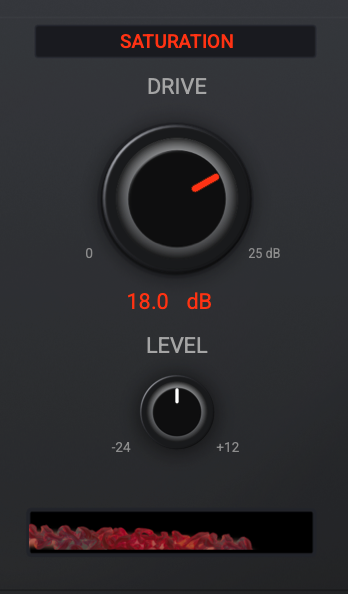
An analog-modeled tape circuit that adds rich, cohesive harmonic distortion and warm compression, giving the dry transients the energy they need to cut through a mix.
DRIVE Adjusts the input gain into the analog tape emulation. Increasing this adds warm harmonic saturation, grit, and natural analog compression.
LEVEL Controls the output level of the saturation module before it enters the Tail Verb. Use this to feed more or less signal into the spatial generator.
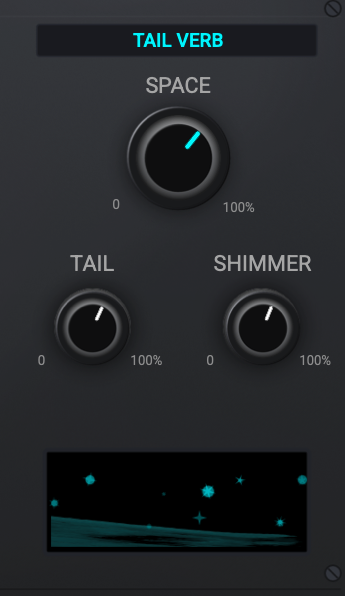
Adaptive Space Injection
A dynamic, particle-style shimmer reverb designed to “spray” a localized, sparkling burst of synthetic space exactly where the excited transients hit, avoiding global reverb wash.
SPACE Blends the processed signal with the reverb. Maximum internal mix is kept to prevent the reverb from overwhelming the core punch of your transients
TAIL Controls the perceived size and decay time of the reverb space. Lower values create tight, metallic room bursts; higher values create wider, expanding spaces.
SHIMMER Adds a bright, pitch-excited, shimmering high-frequency quality to the reverb tail, mimicking
expensive digital plate hardware
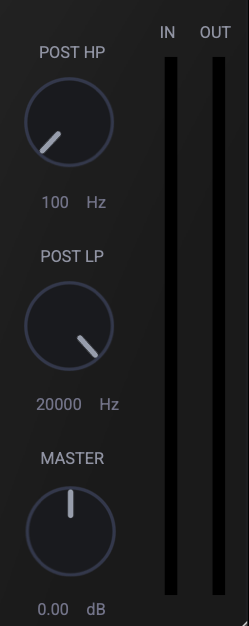
POST FX
The final mixing and utility stage.
HP POST 12dB/oct HP filter. Use to shave off low-frequency rumble or to protect your sub-bass.
LP POST 12dB/oct LP filter. Use this to roll off harsh high-end sizzle or to create a darker, distant spatial vibe.
MASTER LVL Controls the final global output volume of the plugin. expensive digital plate hardware
RESTRUKT / FREE
USE FOR INSTRUMENTS PROCESSINGWHAT TO USE FOR:
Acoustic Drum Loops & Breaks: Perfect for taking old, muddy, or poorly recorded drum breaks, stripping away the old room acoustics, and replacing them with a modern, expensive-sounding virtual space.
Snares, Handclaps, and Percussion: The ultimate treatment for snares. It chokes out ugly ring and bleed, saturates the snap, and adds a lush, shimmering tail.
Synth Plucks & Arpeggios: It tightens the decay of synth plucks to make them incredibly punchy, then wraps them in a wide, shimmering holographic halo.
Acoustic Guitar Loops: Removes the annoying “boxy” room resonance of home recordings while adding tape warmth to the string plucks and a beautiful high-end shimmer to the chord strums.
Untreated Vocals: Use the Reducer to remove cheap home-studio room reflections, add tape warmth to the vocal midrange, and apply a high-end shimmer plate reverb.

64 bits support
Mac Intel / Apple Silicon
Windows 10
Frequently Asked Questions / F.A.Q:
VST3, AU & AAX formats, 64-bits only
* AAX is a trademark and software of Avid Technology. Audio Units is a trademark and software of Apple Inc. VST3 is a trademark and software of Steinberg Media Technologies GmbH.
Ableton Live 11+ / Mac & PC: AU & VST3
Bigwig 4+ / Mac & PC: AU & VST3
Cubase 13+ / Mac & PC: VST3
Digital Performer 11+ / Mac & PC: AU & VST3
FL Studio 23+ / Mac & PC: AU & VST3
GarageBand 10+ / Mac: AU
Logic Pro 10+ / Mac: AU
ProTools 12+ / Mac & PC: AAX
Presonus / Fender Studio One 5+ / Mac & PC: AU & VST3
Reaper 6+ / Mac & PC: VST3
Reason10+ / Mac & PC: VST3 / (Reason Rack: VST3)
Cakewalk Next / PC: VST3
Cakewalk Sonar – VST3
..and many more. If your DAW is suport AU, AAX & VST3 formats, they must work.
| Mac | Windows |
| 64-bits only Intel & Apple Silicon, Mac OS X 10.15 or higher | OS: 64-bits only Windows 10 or higher |
| RAM: 4Gb minimum, 16 recommended | RAM: 4Gb minimum, 16 recommended |
| Disk space: 200Mb free drive space | Disk space: 200Mb free drive space |
Just write to us about problem or any ideas to us: [email protected]
We provides separate installers for macOS and Windows. Launch the installer for your operating system and follow the steps. All selected plugin formats install automatically to their standard locations.
Windows — VST3 (64-bit), AAX
– VST3 installs to: C:\Program Files\Common Files\VST3
– VST3 installs to: C:\Program Files\Common Files\VST3
macOS — AU, VST3 (64-bit), AAX
– AU installs to: /Library/Audio/Plug-Ins/Components
VST3 installs to: /Library/Audio/Plug-Ins/VST3
AAX installs to: /Library/Application Support/Avid/Audio/Plug-Ins
Every license includes 3 activations. You can run the plugin on up to three systems simultaneously. No hardware dongle is required.
The activation window appears automatically the first time you launch the plugin. You can also reopen it later through the License button inside the plugin.
1. Open the activation window.
2. Click Activate your plugin
3. Click Let’s Go!
4. Your browser opens the Audioloom activation page.
5. Sign in with your Audioloom account.
6. The plugin activates automatically.
Use this method on systems without internet access.
Step 1 — Inside the plugin, click Activate your plugin. Select Offline Activation and click Generate Machine File. This creates a machine-specific activation request file.
Step 2 — Transfer the file to a machine with internet access. Open your browser, go to audioloom.com/activate, and drag the machine file onto the page. A license file for your offline machine will be generated.
Step 3 — Transfer the license file back to your offline machine. Activate by dragging the file onto the activation window.
Offline activations are permanent Once an offline activation is used, it is permanently bound to that machine. It cannot be revoked or transferred. Use online activation whenever possible to keep your activation slots flexible.
Online activations can be deactivated at any time, freeing up a slot for another machine. You can deactivate directly inside the plugin or via your account on the Audioloom website.
To deactivate inside the plugin:
1. Open the plugin.
2. Open the license information panel.
3. Click Deactivate.
To deactivate via the website:
1. Log in to your Audioloom account.
2. Navigate to your licenses.
3. In the Activations column, click Manage.
4. Select the active machine and click Revoke.
Offline activations cannot be deactivated If you activated offline, that activation slot is permanently assigned to that machine. Plan your offline activations carefully before proceeding.
Updates Free
Free for lifetime
DAW Support
All main DAWs
Downloads
Links to downlod